Setting Spell Check Options
-
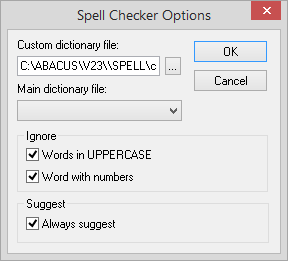
Select File > Setup > Workstation Options. The Workstation Options window appears. Click Spell Check Settings. The Spell Checker Options window appears.
-
Complete or change the settings on the window as follows:
-
Custom dictionary file: The dictionary file that is created from entries you add during the spell check process.
-
Main dictionary file: The dictionary file provided with Abacus Accounting.
-
Words in UPPERCASE: When checked, the spell checker will NOT spell check words in uppercase letters.
-
Word with numbers: When checked, the spell checker will NOT spell check words that contain numbers.
-
Always suggest: When checked, the spell checker will automatically suggest correct spellings for misspelled words.
-
-
Click OK to save your changes.